Memory Device
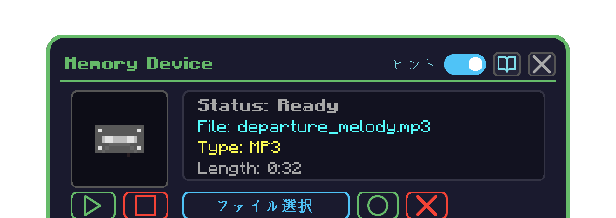
The block that writes an audio file from your PC onto a recording medium. Once written, the medium plays in a Playback Device.
How to open
- Place the Memory Device
- Right-click it to open the GUI
- The first player to open it becomes the owner (the face icon toggles public / private)
Operation
| What you want to do | How |
|---|
| Pick an audio file | Click Select File — your OS file dialog opens |
| Insert a medium | Put an empty recording medium in the input slot |
| Write it | Click ●. The arrow bar fills, and the result moves to the output slot |
| Clear the selection | Click × |
| Preview | ▶ / ■ — plays the finished medium if there is one, otherwise the pending file |
| Public / private | Click the face icon in the lower right |
Reading the screen
| Element | Meaning |
|---|
| Jacket | Cover art embedded in the audio; a medium icon when there is none |
| Status | Ready / writing / why a write was refused |
| File, format, length | The finished medium's details, or the pending file's |
| Input slot | Where the empty medium goes |
| Output slot | Where the written medium appears |
When it refuses to write
| Message | Meaning |
|---|
| Insert a recording medium first | The input slot is empty |
| Select an audio file first | No file has been picked |
| Remove the finished medium first | The output slot is still occupied |
