Playback Device
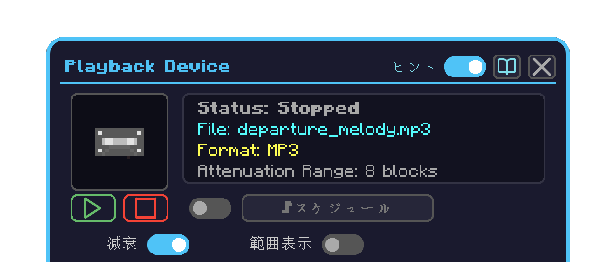
The block that plays media written by the Memory Device. It plays a single medium, or several in order through the ♪ Schedule.
How to open
- Place the Playback Device and right-click it
- The first player to open it becomes the owner
Operation
| What you want to do | How |
|---|
| Play one medium | Put it in the media slot and click ▶ |
| Stop | Click ■ — this stops a single medium and a running schedule alike |
| Set the range | Put a Range Board in the range slot |
| Toggle attenuation | The Attenuate switch |
| Show the range | The Show Range switch |
| Build a sequence | Turn the schedule toggle on → the ♪ Schedule button → schedule screen |
| Public / private | The face icon on the right |
Reading the screen
| Element | Meaning |
|---|
| Jacket | Cover art of the medium in the media slot |
| Status | Playing / stopped |
| File, format | Details of the medium in the media slot |
| Range slot (left) | Holds the Range Board |
| Media slot | Holds the medium played by ▶ |
| ♪ Schedule | Opens the sequence editor |
