
Redstone Output
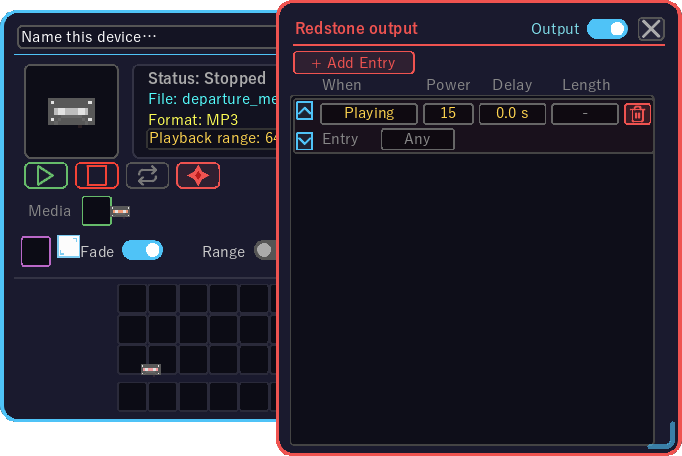
Makes the Playback Device send a redstone signal along with what it plays: light a lamp while it sounds, or send a pulse when a sound starts, is stopped or reaches its end - to open doors, push pistons or drive other circuits.
How to open
- Right-click the Playback Device to open it
- Click the redstone button (the red frame) to the right of ▶ ■ ↻ — the settings open beside the main screen
Operation
| What you want to do | How |
|---|---|
| Turn the output on | The Output switch at the top right (the master switch: while it is off no rule sends anything) |
| Add a rule | + Add Entry (16 at most) |
| Change the condition | Scroll over When: Playing / On start / On stop / On end |
| Signal strength | Scroll over Power (1 to 15) |
| Delay it | Scroll over Delay (half-second steps, up to 30 seconds) |
| Pulse length | Scroll over Length (tenth-of-a-second steps, up to 5 seconds; not used by Playing) |
| Which entry it reacts to | Scroll over Entry: Any (anything that plays, single medium included) / #1 to #16 (that schedule entry only) |
| Reorder | The ▲ / ▼ at the left of the row |
| Delete | The row's ✕ |
What the conditions do
| When | Output |
|---|---|
| Playing | Holds the strength while the device sounds (switching on and off the delay later) |
| On start | A pulse when a sound starts |
| On stop | A pulse when the device is stopped by a player, redstone, the schedule or the API |
| On end | A pulse when a sound reaches its natural end |
When several rules are active at once, the strongest one is output. The signal is weak power on every face of the device, so dust, a lamp, a repeater or a piston placed against it sees it.