
Announcement Settings (SAS integration)
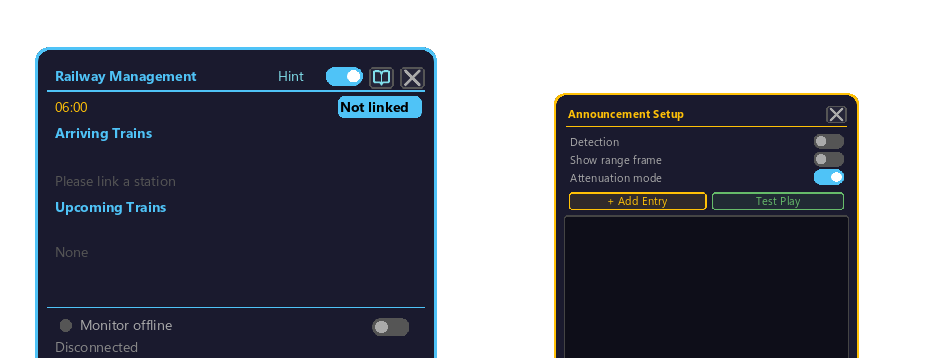
A popup shown when StationSoundSystem (SAS) is integrated. Manages departure melodies, announcements, and jingles tied to train events such as arrival / departure / pass-through.
How to open
- Right-click the Railway Management Block to open its GUI.
- Click the "Function ▼" button on the monitor row.
- From the list that appears, click "Announcement" to open this announcement settings popup ("Announcement" only appears when SAS is installed).
Top-level settings
Each toggle switches ON / OFF when clicked.
| Item (display name) | Operation | Use |
|---|---|---|
| "Detection Enabled" toggle | Click | Overall announcement ON / OFF (master switch) |
| "Range Frame Display" toggle (client-side) | Click | Visualize the detection range with a border (your screen only; for alignment) |
| "Attenuation Mode" toggle | Click | ON = distance attenuation, OFF = uniform near the station |
Entry management
An entry = a (condition) → (audio to play) pair. A station holds multiple entries in order and plays the entry whose condition matches. Audio is assigned by putting an SAS storage-medium item into each entry's slot.
Adding, deleting, and testing entries
- Click the "+ Add Entry" button: adds a new entry.
- Click the "Test Play" button: plays for a functional check.
- When there are many entries, scroll over the list with the mouse wheel.
Choosing a condition (dropdown)
Clicking an entry's condition display (with ▾) opens a list, and you can click to pick from the following 3. Right-clicking the condition display resets it to "None".
| Condition (display name) | Trigger |
|---|---|
| None | Does nothing (a disabled entry) |
| On pass | The moment a train passes through the detection range |
| On stop | The moment a train stops within the detection range |
Timing and repeat count
The following values on each entry are increased/decreased by hovering the cursor over the value and using the mouse wheel.
| Item (display) | Operation | Content |
|---|---|---|
Delay (↕ +Ns) | Hover value → wheel | Delay in seconds from when the condition is met until playback (negatives allowed) |
Repeat count (↕xN) | Hover value → wheel | How many times that entry repeats |
Assigning audio (storage-medium slots)
At the bottom of the popup are 2 item slots: "Detection Card" and "Range Board". Put an item holding SAS audio into them with normal inventory operations (pick up with a click and place), and it becomes that entry's playback audio.
Announcement sharing (Share)
Clicking the "Share" button in the popup opens the "Share with other stations" list, where you can share this station's announcement settings with other stations (= stations registered in the management computer).
Click the 2 toggles to the right of each station in the list to turn sharing ON / OFF individually per station.
| Toggle (display name) | What is shared |
|---|---|
| "Detection" | Shares the Detection Card (detection range) setting |
| "Range" | Shares the Range Board (operating range) setting |
- When there are many stations, scroll over the list with the mouse wheel.
- Conversely, when this station is receiving a share from another station, "Shared from ○○" is shown at the top of the popup.
Related
- Railway Management Block
- Monitor Settings
- Color Settings
- StationSoundSystem official repository (external)