
Material Refill
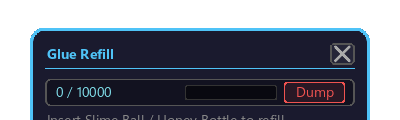
The GUI for refilling the Train Preset Tool's adhesive (Create Super Glue) tank. When placing a preset, adhesive is consumed to glue the train blocks together. You replenish it here.
Opening
This screen is opened from the Preset Browse / Place screen.
- Hold the Train Preset Tool and right-click to open the Preset Browse / Place screen (in GUI mode).
- Left-click the `Refill` button in the glue tank field of the right panel.
- This refill screen opens. To close it, press Esc or left-click the "×" at the top right.
What you can do
| Feature | Summary |
|---|---|
| Refill adhesive tank | Insert slime balls / slime blocks to fill the tank |
| Tank level display | Shows current / max amount (e.g. 0 / 10000) with a gauge |
| Dump | Discards the entire tank contents |
How to add adhesive
Insert slime balls or slime blocks into the input slot in the center of the screen (no other items are accepted).
- Left-click to move slime balls / slime blocks from your inventory into the input slot (Shift + left-click moves them in bulk).
- The moment they are inserted, they are automatically added to the tank (in tank capacity: 1 slime ball = 10, 1 slime block = 90. Max capacity is 10000).
- When the tank is nearly full and there is not even room for one more, nothing is added and the item stays in the slot.
- When you close the screen, any item left in the input slot is automatically returned to your inventory.
Tank level and Dump
- The current / max amount and a gauge are shown at the top of the screen.
- Left-clicking the `Dump` button discards all of the tank contents.
Interaction with preset placement
On the Preset Browse / Place screen, drop a 3D preview into the right panel → confirm placement with "▶ Proceed" → and when you place it in the world, the adhesive stored here is consumed. If there is not enough adhesive, a warning appears in red at placement time and placement is not possible.